
Guide
What does an SEO audit include, and what a score widget leaves out
You pasted your address into a checker, waited sixty seconds, and got a number. Now what? The number does not say what it looked at, whether it read one page or all of them, or which of your problems is the expensive one.
That last part costs people months. Without an order, most site owners fix the cheap and visible things while the page Google cannot open at all sits untouched.
So: what does an SEO audit include, area by area, what does a typical finding look like in plain words, and how do findings get ordered so that the first thing you do is the thing that matters. Everything below is checkable by hand, with no paid tool. The Google and web.dev references were checked on 9 September 2026.
What does an SEO audit include
An SEO audit is a systematic check of a website against the things search engines need in order to find, understand and show its pages. A full one looks at every page, not the homepage alone, and ends with a list of specific problems rather than one number.
A complete audit covers six areas:
- Crawling and indexing. Can Google open your pages, and is it allowed to show them.
- Speed on real devices. Does the page load fast enough on a phone.
- Page structure and content. Does each page have its own title, description and headings, and do they describe what is on it.
- Duplicate and competing pages. Do two of your pages say almost the same thing.
- Structured data. Is the markup that lets a result show a rating, price or date present and valid.
- Links, internal and external. Do your links work, and can a visitor reach every page from somewhere.
Those are the six areas. The first question to ask any checker is which of them it looked at, and most of them will not tell you.
What each area actually checks
Read the third column first: it is the same finding written the way it will cost you, rather than the way a tool labels it.
| Area | What is checked | What a typical problem looks like |
|---|---|---|
| Crawling and indexing | Whether pages are reachable and allowed to appear. Two files decide most of this: robots.txt, which tells crawlers where they may go, and sitemap.xml, which lists the pages you want found | Google cannot open the page at all, or a line in robots.txt is telling it to stay away |
| Speed on real devices | How long the main content takes to appear on a phone, measured by Core Web Vitals | The page takes six seconds to show anything, and people leave before it finishes |
| Page structure and content | Titles, descriptions, headings, and whether the page answers what people typed | A title that repeats on nine other pages, so nothing in the search result tells anyone which to pick |
| Duplicate and competing pages | Near identical pages and thin pages with little on them | Two pages say almost the same thing, Google picks one, and not always the one you would have chosen |
| Structured data | Presence and validity of the markup that describes what a page is | The result shows no rating, price or date, because the markup is missing or broken |
| Links, internal and external | Broken links, pages nothing links to, and whether the site is served over HTTPS | A link returns a 404, meaning the page it points at is gone, or a page exists that nothing points at |
Speed is the one area with a published number to aim at. Largest Contentful Paint, the moment the largest piece of content appears, should happen within 2.5 seconds at the 75th percentile of real page loads (web.dev). It is one of three Core Web Vitals, alongside Interaction to Next Paint and Cumulative Layout Shift.
An SEO audit checklist for beginners
Six checks that need nothing but a browser:
- [ ] Open three pages in a private window and check that each one loads.
- [ ] Open one page on your phone on mobile data and count the seconds before you can read anything.
- [ ] Read the browser tab title of five pages and check that no two are identical.
- [ ] Find two pages of yours on the same subject and decide which one should win.
- [ ] Paste one page into Google's rich results test and see whether any markup is found.
- [ ] Click every link in your menu and footer, and note any that go nowhere.
Technical checks in plain words
Four terms you will meet in any report, each explained without using another term:
- Indexing is Google having a copy of your page and being willing to show it. A page can exist, be perfectly good, and still not be indexed.
- A canonical is a line on a page saying "this other address is the real one", so that near identical pages do not compete (Google Search Central). Pointed at the wrong address, it hides a page you wanted shown.
- A redirect sends anyone asking for one address to another. Useful after a move, a problem when it points at something gone.
- A crawl walks your links and collects what it finds. An audit is the crawl plus the judgement on top: a crawl gives you a spreadsheet, an audit gives you the first three things to do.
Why a score out of 100 is not an audit
A score is a summary, and you did not come for a summary. It compresses everything the tool looked at into one number and throws away the thing you needed: which problem is the expensive one. When you ask a website SEO checker what it checks, most do not answer.
| A sixty second score widget | A full crawl |
|---|---|
| Usually looks at one page, often the homepage | Looks at every page it can reach |
| The weighting is chosen by whoever built it, and rarely published | Reports each finding separately, so nothing hides inside an average |
| Does not tell you what to fix first | Puts findings in priority order |
| Names findings in tool language | Explains each finding in words you can act on |
| Leaves you with a number | Leaves you with a list |
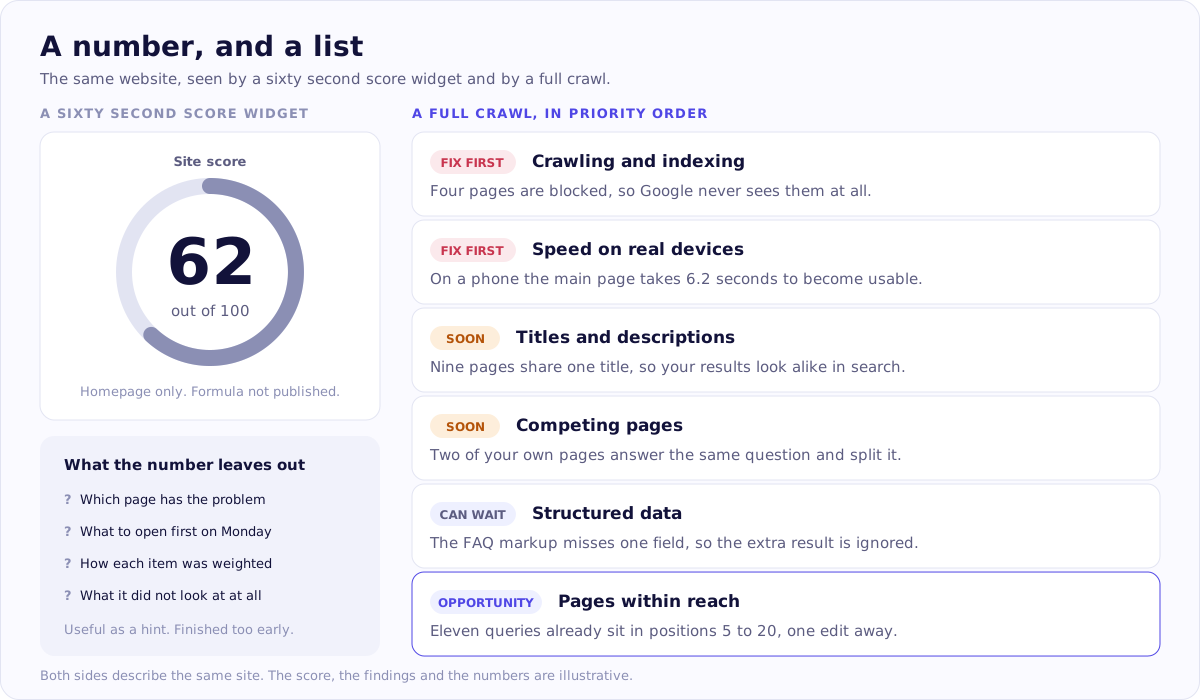
The same site, seen both ways. Look at the right hand column: every finding is named, explained in ordinary words and placed in order, which is the part a single number throws away. The score, the findings and the numbers are illustrative.
This is also why two checkers give the same site very different numbers on the same day. They are not disagreeing about your site: they check different things, weight them differently, and almost none publish the formula. Comparing two scores tells you about the two tools.
So what is a good SEO score? No number answers that across tools: a score is useful only against itself, on the same site, with the same tool, over time. Score widgets are not bad, they are just finished too early. A number tells you something is worth looking into. It does not tell you what to open first.
How findings get prioritised
Forty findings in no particular order is a report nobody finishes. Here are the four levels, in the order they deserve your attention:
- Google cannot see the page at all. Blocked, not indexed, returning an error. Nothing else on that page matters until this does.
- The page loads, but people leave before it finishes. Slow pages on phones, layouts that jump around while loading.
- The page works, but says the wrong thing or says nothing. A title that does not match the query, a thin page, two pages competing.
- Cosmetic items that can wait. Missing alt text on decorative images, small markup warnings. Real, and not this quarter's problem.
The order matters more than the completeness of the list. Fixing the three items in level one does more than working alphabetically through forty. This is the same ordering that AI SEO content software applies programmatically, and the Kitto audit reports findings in these bands rather than as a single figure. One honest limitation on our side: Kitto is new, so there are no independent reviews of it to read yet. The audit reads any site, whatever it is built on, so you can judge the work first.
What an audit cannot tell you
Four things an audit cannot do for you, so that nobody sells you one on those grounds:
- Tell you whether your text persuades anyone. It can see that a page is readable. It cannot see whether it sells.
- Judge your expertise for you. Google's guidance calls this E-E-A-T: experience, expertise, authoritativeness and trust (Google Search Central). Whether you know the subject you write about is a judgement a reader makes, not a check a crawler runs.
- Predict positions or traffic. No audit does this, and any tool that claims to is describing a hope, not a measurement.
- Replace watching what actually happened. That lives in your own Google Search Console, which records the queries where your site appeared and where it sat. The Search Console opportunities guide walks through it step by step.
What to do after the audit
Five steps, in order.
- Take the whole of level one first. Everything Google cannot see or cannot show. Nothing else competes with this.
- Fix what you can fix in your own admin. Most of level two and three is editing rather than coding: titles, descriptions, headings, duplicate pages, broken links. Minutes per page, no developer involved.
- Put the rest on a list for whoever handles your code. Server response times, redirect chains, template level markup. Keeping them apart stops the list you can act on from feeling impossible.
- Write down the date. You will want to know later what changed and when.
- Come back in four to eight weeks and look at the same pages in Search Console: impressions, clicks and average position, before and after.
If you do not have a report to work from yet, you can run a free SEO audit on your own site. It needs no card and no account, it covers all six areas above, and every finding comes with a plain explanation plus a ready made instruction you can hand to any AI assistant you already use.
Questions people ask about this
What does an SEO audit include?
Six areas: whether Google can crawl and index the pages, how fast they load on a phone, whether each page has its own title, description and headings, whether pages duplicate each other, whether structured data is present and valid, and whether internal and external links work.
How long does an SEO audit take?
The automated part takes minutes, because a machine is fetching pages. Reading the findings and deciding what matters takes an hour or two. Fixing them takes weeks, because most fixes touch real pages and some need a developer. Anyone quoting one number is describing only the first part.
Is a free SEO audit worth it?
It depends entirely on what comes back. A useful one names the checks it ran, explains each finding in plain words, and puts the findings in order so you know what to do on Monday morning. A number on its own is not much use, because you cannot tell what it measured. That is the whole difference between the two columns in the table above, and it is why Kitto's audit gives you a list, needs no card and asks for no account.
Can I do an SEO audit myself?
The basic part, yes. All six areas on this page are checkable by hand with free tools, and the priority order above tells you where to start. What takes practice is the judgement: deciding which of forty findings actually matter for your site rather than working through them alphabetically. If you would rather have that ordering ready made, that is exactly what our audit hands back.
What happens to my site when you run the audit?
Nothing. We fetch your public pages the way any search engine does, read them, and write back. We do not change anything, we do not publish anything, we do not need access to your site, and we do not need your Google account. The report is yours to keep whether or not you ever come back.
How often should I audit my website?
Once a quarter is enough for a small site, plus one extra look after any large change: a redesign, a move to a new platform, a change of URLs, or a big batch of new pages. Auditing more often than that mostly surfaces the same items again.
Do I need to give my Google account to run an audit?
Not to check the site itself. Anyone can fetch your public pages, so the crawl needs no access from you. Access to Google Search Console is a separate, optional step, and it is only about seeing your own search queries rather than about checking the pages.
Where these facts come from
- Google Search Essentialschecked 9 September 2026
- Google Search Central: introduction to robots.txtchecked 9 September 2026
- Google Search Central: sitemaps overviewchecked 9 September 2026
- Google Search Central: canonical URLs and duplicate pageschecked 9 September 2026
- Google Search Central: helpful content and E-E-A-Tchecked 9 September 2026
- Google: introduction to structured data markupchecked 9 September 2026
- web.dev: Core Web Vitalschecked 9 September 2026
- web.dev: Largest Contentful Paint thresholdschecked 9 September 2026
- Search Console Help: Performance reportchecked 9 September 2026
