
Guide
Automated blog posting on WordPress with AI: publish straight to live, or review the drafts first
Yes, this works, and it works in two different ways. Automated blog posting on WordPress with AI either puts the finished article straight onto your live site, or leaves it sitting in your admin area as a draft with your name on it, waiting for five minutes of your attention.
Those two paths give you genuinely different weeks, and choosing between them takes about five minutes once you know what to weigh. Below is what actually happens between "the article is written" and "the article is public", the two modes set out side by side, the signs that point to each, what to do if something goes out that you do not like, and how often is too often. We take no affiliate payments and this page names no products.
How automated blog posting on WordPress with AI actually works
Whatever tool sits in the middle, the shape is the same five steps.
- A topic is chosen, either from search demand data, from your own Search Console history, or from a list you supply.
- A draft is written against that topic, usually with an outline first and then the article.
- The draft is checked before it goes anywhere: claims compared against sources, and anything unconfirmed flagged for a person to look at.
- The draft becomes one of two things. Either a post with the status "draft" in your WordPress admin area, visible only to you, or a published page on your live site. This step is the whole subject of this page, and it is the only one where the two paths differ. In WordPress terms it is the difference between the draft and publish post statuses.
- The result shows up in your reports, on your own site's addresses, whichever path it took.
Everything people mean by auto publish ai articles wordpress lives in step four. Steps one to three are identical in both modes, which is worth saying plainly, because most of what gets written about the risks of automation is really about step three. The category as a whole is described in the guide to AI SEO content software.
The two modes, side by side
Both modes run end to end and both are complete. Switching between them is one setting, and the choice is not final.
| What happens | Show me the first few articles first | Publish automatically |
|---|---|---|
| Where the article appears | As a draft in your WordPress admin area, visible to you and to anyone else who can sign in to it, and to no visitor | As a published page on your live site, at its own address |
| What you get in your inbox | A short message saying an article is ready, with a link straight to it and a list of anything the checks could not confirm | A short message saying an article is live, with the link and the same list of anything unconfirmed |
| How long it waits | As long as you like. Nothing expires and nothing is lost | It does not wait. The article goes out when it is finished |
| What happens if you do nothing | The draft stays a draft, and your allowance is not spent | The article stays live. Editing or unpublishing it later is normal and takes a minute |
| When it goes live | When you press publish, which is usually about five minutes of reading per article on our own observation | As soon as the checks are passed |
| What it costs you in time | Around five minutes an article, plus the time to act on anything marked | Nothing per article, plus whatever you choose to read afterwards |
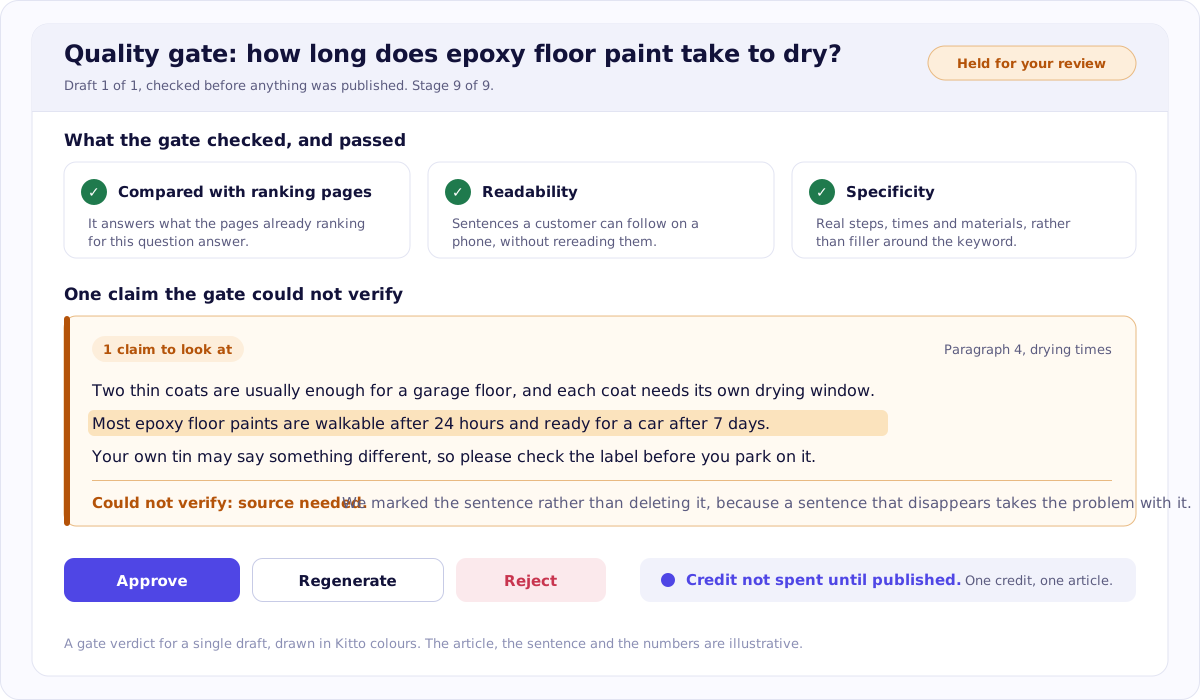
The same report reaches you in both modes. Look at the marked sentence: in the first mode you see it before the article is public, in the second you see it after, and in neither case is it quietly removed. The article, the checks and the wording are illustrative.
Both columns describe finished behaviour. The first mode is preselected because it is what a new customer actually wants, not because the second is unfinished. In both modes the checks run before publication, which is where the real safety lives, and the fact checking AI drafts guide sets out what those checks look at and what "marked but unconfirmed" means in practice.
Which one fits your site
Take whichever list you nod at more often.
Look at the first few articles yourself if:
- Your site is under a year old, or has little history for search engines to go on.
- Your subject is one where a wrong figure is expensive: health, money, law, safety.
- You have not yet seen what a finished article from this tool looks like.
- You are planning fewer than five articles a month, so reading them is minutes rather than an afternoon.
Publish automatically if:
- You have already read several and you know what to expect.
- The volume has reached the point where reading every one stopped being realistic.
- Your subject is not one where a small error costs anybody anything.
- Regularity matters more to you than approving each individual piece.
Neither list is the right answer. Most people start with the first, keep it for a handful of articles, and switch when they stop being surprised by what arrives. Some switch back for a month when they change subject. That is a normal way to use it, not indecision.
One honest limitation on our side: Kitto publishes to WordPress and to nothing else yet. If you are on another platform, this guide still describes the choice accurately, and the part of us you can use today is the audit. Whichever mode you eventually pick, it helps to know what your site actually needs first, so you can run a free SEO audit before you set anything up: no card, no account, and the findings are yours to keep.
What to do when an article is already live and you do not like it
Four steps, in this order.
- Move it back to draft rather than deleting it. The text is preserved, the page stops being public immediately, and you keep the option of fixing it.
- Fix what is actually wrong. Usually one claim, one paragraph or a title that promises something the article does not deliver.
- Publish it again at the same address. Do not change the address. A new address throws away whatever the old one had built up and leaves you with a dead link.
- If it had been live long enough to be found by search engines, give them time to fetch it again. Days, sometimes a few weeks. Nothing you do makes that part faster.
The instinct to delete is the one to resist. A deleted article takes its address with it, and if anything ever linked to it, that link now goes nowhere.
How often is too often
There is no published number for this. Not from Google, not from us, and any page that gives you one is presenting a preference as a rule. What exists instead are three orientations.
Proportion. Ten new pages on a site of twenty is a different event from ten new pages on a site of five hundred. Judge the pace against what you already have.
The ceiling is not a recommendation. Whatever maximum a piece of software allows is an engineering limit, not advice. Kitto allows at most two publications a day for one site, which is a property of the software rather than a target to reach.
Timing is a setting, not a rule. If you came looking for how to schedule AI blog posts in WordPress, the schedule lives in whatever tool writes them rather than in WordPress itself, and the pace you pick there is the pace your site gets.
Steadiness beats bursts. A regular pace you can sustain is easier to check, easier to measure and easier to explain than forty pages in a fortnight followed by silence.
The only rule that matters here comes from Google's spam policies, which describe making many pages mainly to move rankings rather than to help anyone. That is about why the pages exist rather than about how quickly they appear, and the is AI content safe for SEO guide takes the policy apart line by line.
Questions people ask about this
Is an AI blog autopilot for WordPress safe?
Safety here comes from what is checked before a page goes out, not from which of the two publishing modes you picked. A draft that has been fact checked against sources, with anything unconfirmed marked for you, is the same draft whether it waits in your admin area or goes straight to the live site.
How many AI posts a week should I publish?
There is no published number, from Google or from anyone else, and a page that gives you one is guessing. What matters is proportion to your site and steadiness over time. As a property of our own software rather than advice from Google, Kitto publishes at most two articles a day for one site.
Does automated posting hurt SEO?
Publishing on a schedule is not itself the issue. Google's spam policies describe making many pages mainly to move rankings rather than to help anyone, which is about purpose and volume rather than about who pressed publish. The guide on whether AI content is safe for SEO covers what those policies actually say.
Do I need a plugin to auto publish AI articles?
You need something that can create a post in WordPress on your behalf, and there are three usual shapes: a plugin you install, an application password used with the WordPress REST interface, or a webhook into an automation you already run. Which shape you use is a matter of what you are comfortable installing.
Can I switch from drafts to automatic later?
Yes, and that is the normal order. Most people look at the first few articles, decide the output is what they expected, and turn the waiting off. Switching back the other way is the same single setting, so nothing about the choice is permanent.
What happens if I do not review a draft?
It stays a draft. Nothing is published on your behalf while the first mode is selected, so a week away from your desk leaves you with unread drafts rather than unread live pages. The articles wait, and your allowance is not spent on anything that never went out.
Where these facts come from
- Google Search spam policies: scaled content abusechecked 9 September 2026
- WordPress documentation: post status, including draft and publishchecked 9 September 2026
