
Guide
How to find low hanging fruit keywords in Google Search Console
You open Search Console, you see a table of a few thousand queries, and you close it again. It is a reasonable reaction: the report shows everything and suggests nothing.
About twenty of those rows are worth your time. They are the low hanging fruit keywords in Google Search Console: searches where Google already shows your site, just below the place where people start clicking. The filters that find them are already in the interface, and they take four clicks.
Below are those filters, a stop list for the rows to throw away, and one decided action for every row that survives. Nothing here needs a paid tool.
What low hanging fruit keywords in Google Search Console actually mean
A low hanging fruit keyword is a search where your site already appears in Google's results, close to but below the positions that get clicks. Google has already agreed that your page belongs on that search. You are moving something that half works, which is cheaper than starting from nothing.
You may have seen the same idea called "striking distance keywords" elsewhere. It is the same thing. Three signs that a query belongs in this group:
- Your site already appears for it. It has impressions, so it is being shown.
- The average position is close to the first page, but not near the top of it. Usually between 5 and 20.
- It is a query you would genuinely want traffic from. Someone searching it could plausibly become a reader, a subscriber or a customer.
If any of the three is missing, the row is not low hanging fruit, whatever the numbers look like.
Why position 5 to 20 is the zone worth your time
Both Google references in this guide were checked on 9 September 2026. Position in Search Console is the average place your site appeared for that query, counting the topmost result whenever it was shown (Search Console Help). Search Console queries position 5 to 20 is the band worth your time, and different positions inside it usually mean different problems.
| Position band | What it usually means | Worth touching |
|---|---|---|
| 1 to 4 | The page already works for this query | Only if the clicks look low for the impressions |
| 5 to 10 | Google shows you on page one, lower down | Yes. Often the title and description do the most work here |
| 11 to 20 | Just off page one, so almost nobody sees it | Yes. This usually needs the content improved, not the snippet |
| 21 and below | A long way back, for many possible reasons | Usually costs more than writing a new page |
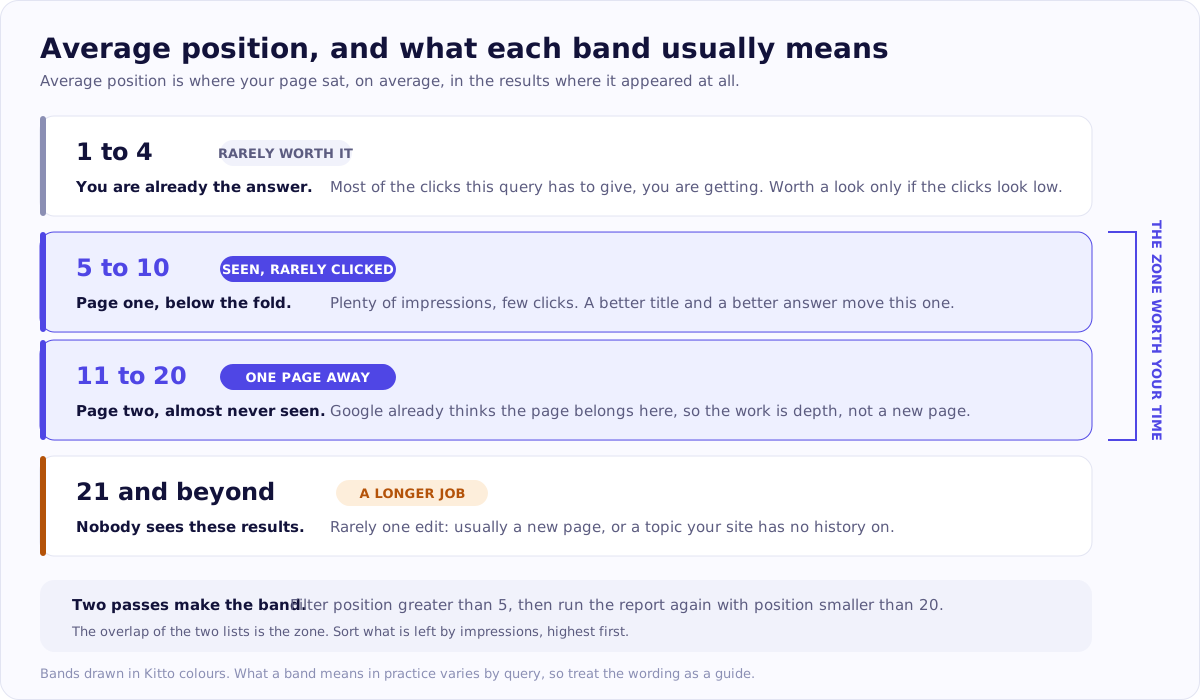
The same four bands, with the zone marked. Look at the two middle rows: they are the ones where a page you already have can move. The wording is a rule of thumb, not a promise.
Treat the bands as a rule of thumb. They tell you what kind of work is in front of you, not what will happen. Published click through rate curves by position, such as the free monthly study from Advanced Web Ranking, are orientation only: your own numbers will differ, and that study notes a markedly lower click through rate at the top when an AI Overview appears.
How to use Search Console to plan content: the report step by step
Seven steps, each one a single action in the interface.
- Open the Performance report. In Search Console, choose your site, then Performance, then Search results.
- Set the date range to Last 6 months. The default of three months hides slow, steady queries. Search Console keeps data for the last 16 months (Google), and that window slides: every month you put this off is a month of history you cannot get back.
- Turn on all four metrics. Click Total clicks, Total impressions, Average CTR and Average position above the chart, so all four appear as columns in the table below. The last two are off by default and they are the two you need.
- Switch to the Queries tab. The table underneath the chart has tabs. Queries is the first one.
- Filter by position. Use the filter above the table, choose Position, then Greater than 5. Look at that list, then run the same report again with Smaller than 20. The overlap of the two passes is your zone.
- Sort by impressions, highest first. Click the Impressions column heading, then draw a line: on a site with steady traffic, ignore anything under about 100 impressions in six months, because there is too little data there to judge.
- Take the top twenty rows. Export them, or work down the list on screen. Twenty is enough for a first pass.
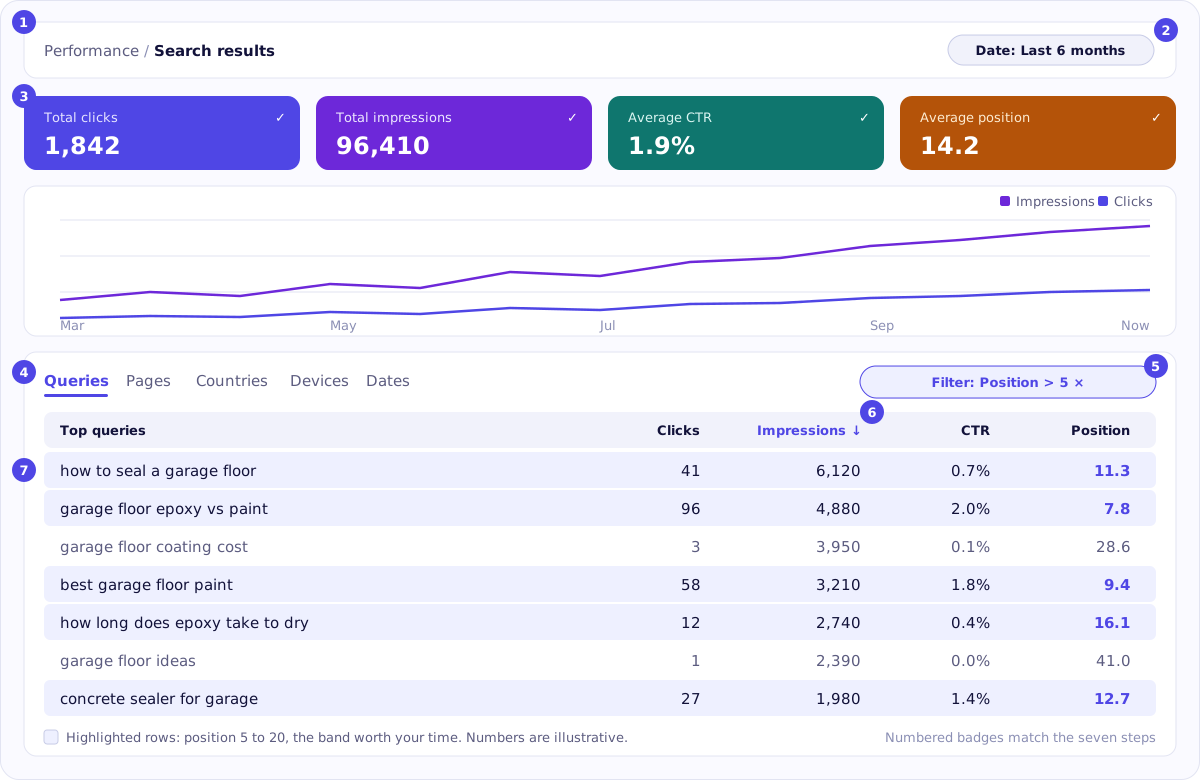
The report after the seven steps, drawn in Kitto colours. The numbered badges match the steps above; the highlighted rows are the ones in the 5 to 20 band. The queries and numbers are illustrative.
If your site is small. A site with 300 impressions a month returns nothing at a 100 impression threshold. Keep the method, move the numbers: 12 months instead of 6, and 20 or 30 impressions instead of 100. The list will be shorter, not worse.
What to do when the list is empty
An empty list is an answer, not a failure. It says your site has no positions in that band yet, and the next question is a different one: can Google see and index your pages at all. That is a whole site question, and what an SEO audit includes walks through the areas to look at, in order.
High impressions, low clicks in Search Console: three different problems
A row with many impressions and almost no clicks is not one problem. It is one of three, and they need different work. Read the position column before you decide anything.
| What you see | What it usually is |
|---|---|
| Position 5 to 10, clicks low for the impressions | The result is seen and not chosen. A snippet problem |
| Position 11 to 20, clicks near zero | A normal outcome for that position. A content problem |
| High impressions, near zero clicks, query unrelated to your business | Not an opportunity at all. Noise |
Branch A, a snippet problem. People see your result and click something else. The title and the description do the persuading here, and both are editable in minutes. Make the title answer the exact question in the query, in words a person would use.
Branch B, a position problem. At position 14 almost nobody scrolls that far, so a low click through rate is expected rather than a symptom. Rewriting the title will not help much. What usually helps is the page answering the query more completely than it does now.
Branch C, noise. A page sometimes picks up impressions for a query unrelated to what you do. Skip the row.
Decide what to do with each row
Four questions, in this order. Together they turn a filtered table into content gaps Search Console can prove you have, and into Google Search Console content ideas you can act on this week. Stop at the first question that gives you an action.
- Is there already a page Google shows for this query? Click the query in the table, then open the Pages tab. Search Console will show which URL was served. If there is one, you are editing, not writing.
- Does that page actually answer this query, or a neighbouring one? Read the page as if you had typed the query. If it is about a related but different question, the honest answer is a new page for this query, and an internal link between the two.
- Is there a direct answer in the first hundred words? Many pages answer the question in paragraph nine. Moving a two sentence answer to the top is often the cheapest change available, and it makes the page easier to quote.
- Are two of your own pages competing for the same query? This is keyword cannibalisation, and Search Console shows it plainly: if the Pages tab shows the served URL flipping between two of yours, they are splitting the signal. Usually the better move is to merge them and redirect the weaker URL.
The four actions this produces, in rough order of effort: rewrite the snippet, add a missing section, write a new page, merge two pages into one. If you draft any of this with a language model, check every number, date and name against a source first. The page carries your name, not the model's, and an invented statistic embarrasses you alone. That is the entire reason Kitto marks the claims it could not verify instead of leaving them in quietly.
Rows you should skip
A stop list saves more time than the filters do. Skip a row if it is:
- Your own brand name. Those people were coming anyway.
- Somebody else's brand name. You are unlikely to outrank a company for its own name, and it is not traffic that converts.
- A question Google answers on the results page itself. Conversions, dates, definitions of one word. The click often never happens for anyone.
- A query about something you do not do. Interesting, occasionally flattering, still not your business.
- A single spike rather than steady impressions. Look at the trend, not the total. One news week is not demand.
- A results page filled with marketplaces and aggregators. If the whole first page is large platforms, a small site is not the missing tenth result.
Check whether it worked
Three steps, and the third one is the part almost everyone skips.
- Write down the date you changed the page, and what you changed. A note in a text file is enough.
- Wait four to eight weeks. Google has to recrawl, and the report lags by a couple of days.
- Open the same report with the same filters and turn on Compare. In the date range picker, choose Compare, and set the period after your change against the period before it. Read impressions, clicks and average position side by side for that query.
Sometimes the position moves, sometimes it does not, and sometimes it moves for reasons that have nothing to do with you. That is exactly why you look at your own Search Console report rather than anyone's dashboard: you get the real answer either way.
If your list came back with fifty rows and you cannot tell which to start with, look at the whole site first. You can run a free SEO audit with no card and no account, and it puts every finding in priority order rather than handing you another table to sort. One limitation, said out loud: for publishing, Kitto works with WordPress and nothing else yet. The audit reads any site, whatever it is built on.
A quick recap
- Open Performance, Search results, Last 6 months, all four metrics on, Queries tab.
- Filter Position greater than 5, then smaller than 20, and sort by impressions.
- Drop the rows on the stop list before you look at anything else.
- For each remaining row, read the position to decide whether it is a snippet problem or a content problem, then work through the four questions to pick one action.
- Note the date, wait four to eight weeks, and compare the same report against itself.
Done by hand, that is about twenty minutes the first time. Done every month on a growing site, it is most of a working day a quarter, which is the part software is for. This is the same review that AI SEO content software runs programmatically: Kitto repeats it in your Search Console data and hands you the rows with one suggested action each. The method above stays free and yours, and doing it once by hand is the best way to judge whether any tool does it properly.
Questions people ask about this
What are low hanging fruit keywords in SEO?
They are searches where your site already appears in Google's results, close to but below the positions that get clicks. Google has already decided the page is relevant, so improving it is usually cheaper than writing a new page for a topic you have no history with.
What is a good CTR in Google Search Console?
There is no single good number. Click through rate depends on the position, the query, the device and what else is on the results page. Published CTR curves are useful as rough orientation only, and your own site will differ. Compare a page against your own other pages first.
How long does Search Console keep my data?
Google states that Search Console keeps data for the last 16 months. That is why a six or twelve month window works for this method and a 28 day window usually does not: a short window hides slow, steady queries and over weights whatever happened last week.
How often should I check this report?
Once a month is enough for most small sites. Search results move slowly, and checking weekly mostly shows noise. A monthly look at the same filtered report, with a note of what you changed since last time, gives you a clearer picture than daily attention.
Do I need a paid tool to do this?
No. Everything on this page happens inside Google Search Console, which is free for anyone who can verify a site. Paid tools do not see anything about your site that Search Console does not already show you. What they buy you is the repetition: doing this by hand once is twenty minutes, doing it every month on a growing site is most of a working day a quarter.
Can software do this for me?
The filtering and the sorting, yes, and that is most of the time cost. The judgement of whether a row is worth your business is still yours, which is why Kitto shows the reason a topic was picked before anything is written, and why nothing is published until you say so. If you would rather not hand that over at all, the method above is complete on its own and always free.
How long until I see a change after editing a page?
Give it four to eight weeks before you judge anything. Google has to recrawl the page and the report itself lags by a couple of days. Sometimes the position moves, sometimes it does not. Write down the date you changed the page: without it you will not be able to tell the difference between the two.
Where these facts come from
- Search Console Help: Performance report overview and filterschecked 9 September 2026
- Search Console Help: impressions, position and clickschecked 9 September 2026
- Google: Search Console keeps data for the last 16 monthschecked 9 September 2026
- Advanced Web Ranking: Google organic CTR studychecked 9 September 2026
